Professional Portfolio Summary
ITS3105 Programming II – Week 5 Project
This assignment required me to create a functional calculator application using Java Swing. I built the graphical interface with labels, text fields, and buttons arranged through GridLayout, then used ActionListener and event handling so the program could respond to user input. The calculator performs addition, subtraction, and multiplication and includes a Clear function. I also tested each operation and documented the coding strategy and sample run. The objective of the project was to apply object-oriented and event-driven programming concepts in a working graphical application instead of only writing console-based code. This project is relevant to my targeted IT support and service desk job market because troubleshooting software is easier when I understand how software is built. Writing and testing the application required me to follow program logic, recognize how user actions trigger events, identify where failures could occur, and verify that the output matched the expected result. Those same habits apply when diagnosing user-reported software problems. The project also demonstrates patience, technical problem solving, testing, and the ability to explain how an application works. Even when a support role does not require daily programming, understanding code and application behavior helps with troubleshooting, documentation, escalation, and communication with development teams.
Assignment Statement
The original assignment instructions were not retained with the available Week 5 submission. The original course work is reproduced below without replacing or inventing the missing assignment statement.
Original Week 5 Work
Simple Calculator Using Java Swing Joshua Fleming South University ITS3105 Programming II Week 5 Project June 29, 2026
Java Source Code
import javax.swing.JFrame;
import javax.swing.JLabel;
import javax.swing.JTextField;
import javax.swing.JButton;
import java.awt.event.ActionListener;
import java.awt.event.ActionEvent;
import java.awt.GridLayout;


class SetCalculator extends JFrame implements ActionListener {
    JLabel label1, label2, label3;


    JButton btnPlus, btnMinus, btnMultiply, btnClear;
    JTextField txtField1, txtField2, txtField3;


    public SetCalculator() {
        setLayout(new GridLayout(5, 2));
        setTitle("Simple Calculator using Swing");
        label1 = new JLabel("Number 1 :", JLabel.LEFT);
        label2 = new JLabel("Number 2 :", JLabel.LEFT);
        label3 = new JLabel("Result :", JLabel.LEFT);


        btnPlus = new JButton("Add");
        btnMinus = new JButton("Subtract");
        btnMultiply = new JButton("Multiply");
        btnClear = new JButton("Clear");


        btnPlus.addActionListener(this);
        btnMinus.addActionListener(this);
        btnMultiply.addActionListener(this);
        btnClear.addActionListener(this);


        txtField1 = new JTextField();
        txtField2 = new JTextField();
        txtField3 = new JTextField();


        add(label1, 0);
        add(txtField1);
        add(label2);
        add(txtField2);
        add(label3);
        add(txtField3);
        add(btnPlus);
        add(btnMinus);
        add(btnMultiply);
        add(btnClear);
    }
    public void actionPerformed(ActionEvent event) {
        String opt = event.getActionCommand();
        int num1, num2, num = 0;
        num1 = Integer.parseInt(txtField1.getText());
        num2 = Integer.parseInt(txtField2.getText());
        if (opt.equals("Add"))
            num = num1 + num2;
        else if (opt.equals("Subtract"))
            num = num1 - num2;
        else if (opt.equals("Multiply"))
            num = num1 * num2;
        else if (opt.equals("Clear")) {
            txtField1.setText("");
            txtField2.setText("");
            txtField3.setText("");
        }
        txtField3.setText(Integer.toString(num));
    }
}
public class SimpleCalculator {
    public static void main(String args[]) {
        SetCalculator demo = new SetCalculator();
        demo.setDefaultCloseOperation(JFrame.EXIT_ON_CLOSE);
        demo.setVisible(true);
        demo.setSize(300, 500);
    }
}
Sample Run
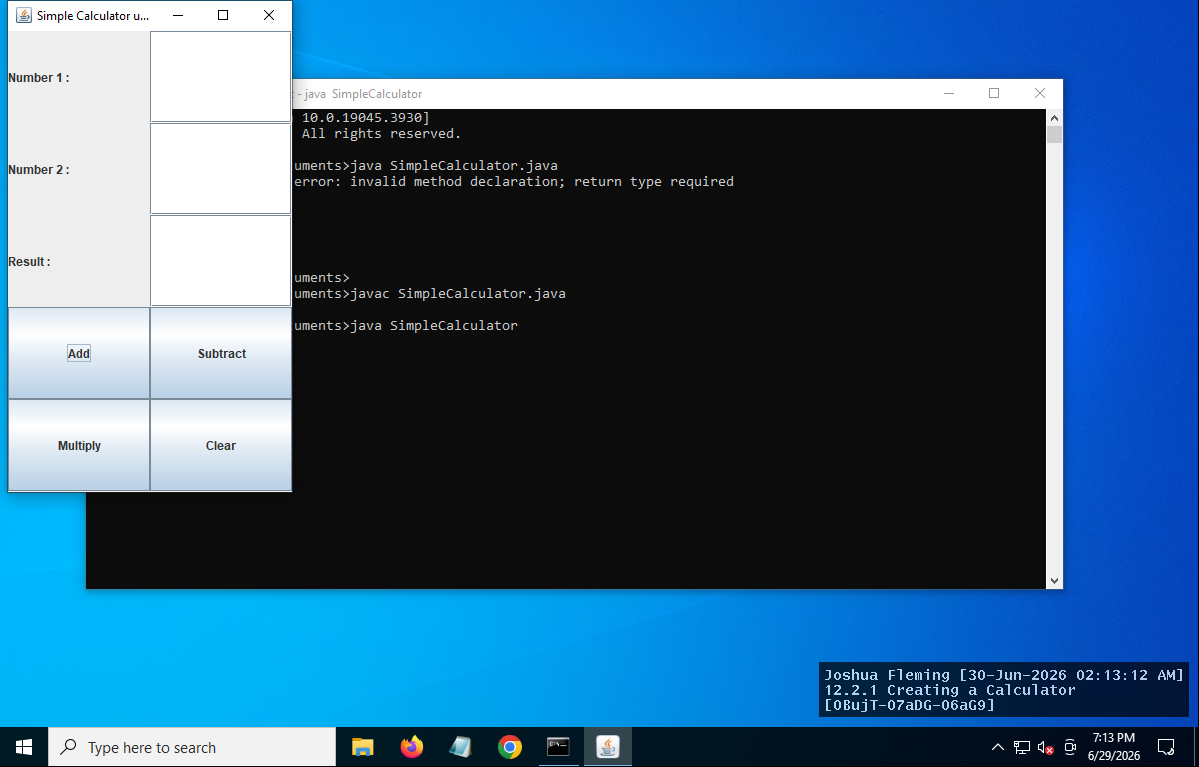
Coding Strategy and Discussion
This project uses Java Swing to build a simple calculator with a graphical user interface. GridLayout arranges the labels, text fields, and buttons in an organized format. ActionListener is used so each button responds to user input. When a button is selected, the program reads the two values entered by the user, performs the requested calculation, and displays the answer in the result field. The Clear button removes all values so another calculation can be completed. While completing this assignment, I tested each operation to verify that addition, subtraction, and multiplication produced the expected results. This project reinforced concepts including event-driven programming, object-oriented design, Swing components, layouts, and handling user interaction. Overall, the assignment provided practical experience creating a functional graphical application instead of a traditional console-based Java program.
References
Farrell, J. (2023). Java Programming. uCertify. (2026). IT Specialist Java. Lesson 12.2.1 Creating a Calculator.