Professional Portfolio Summary
ITS3110 Applied Systems Analysis – Week 5 Project
This assignment developed a complete systems-analysis plan for a proposed Walmart mobile application. The project identified stakeholders, business needs, technical and organizational feasibility, functional and nonfunctional requirements, and an Agile development approach. It also included requirements elicitation, use cases, object-oriented analysis, project scheduling, staffing, communication planning, risk management, testing, and system diagrams. The objective was to take a business problem and move it through the major stages of systems analysis while connecting user requirements to a realistic technical solution. This project is relevant to IT support and service desk work because effective support requires understanding both the user’s problem and the systems behind it. The assignment demonstrates my ability to gather requirements, separate symptoms from actual needs, document processes, consider technical constraints, and communicate with different stakeholders. The Agile planning and risk-management sections also show that I can work within structured IT processes instead of treating technical problems as isolated events. Support professionals regularly document incidents, reproduce problems, coordinate with other technical teams, and explain solutions to nontechnical users. This project demonstrates those same analytical and communication skills while also showing my understanding of software development, testing, system requirements, and the full technology lifecycle.
Assignment Statement
The original assignment instructions were not retained with the available Week 5 submission. The original course work is reproduced below without replacing or inventing the missing assignment statement.
Original Week 5 Work
Course Project Part 5
ITS 3110 – Applied Systems Analysis
12/29/25
Company Description
Walmart Inc. is a multinational retail corporation headquartered in Bentonville, Arkansas. It operates a chain of hypermarkets, discount department stores, and grocery stores, serving millions of customers daily. Walmart offers a wide range of products, including groceries, clothing, electronics, home goods, and sporting equipment. For the purposes of this project, Walmart is assumed to not currently have a mobile application. Developing a mobile app will enhance the in-store shopping experience, provide interactive product information, and guide customers through Walmart’s extensive inventory using data-driven and location-based features (Walmart Inc., 2025).
Potential Stakeholders
Customers – Primary users who will benefit from features such as store navigation, product demonstrations, and geo-location activity suggestions.
Store Managers – Provide input on store layouts, product placement, and in-store navigation.
Walmart IT Department – Responsible for ensuring technical feasibility, maintaining the application, and integrating data-driven content.
Marketing Team – Utilize the app for targeted promotions and to gather insights on customer behavior.
Inventory Managers – Ensure that real-time product availability is accurately reflected within the application.
Programmer Analyst / Development Team – Responsible for planning, designing, coding, testing, and implementing the application.
The selection of these stakeholders ensures that all parties affected by the application—users, operational staff, and technical personnel—are considered in the project development process (Laudon & Traver, 2023).
Statement of Work
The objective of this project is to develop a mobile application for Walmart that enhances the shopping experience through offline, data-driven features and location-based suggestions. The application will include:
Store Navigation: Customers enter a product name and receive directions to the exact aisle or section within the store.
Product Demonstration Videos: Customers can scan product barcodes using the device camera to view offline video demonstrations of products.
Geo-Location Activity Suggestions: Based on the selected product type, the app recommends nearby locations where customers can try or use the product. Examples include:
Sporting goods: nearby gyms, basketball courts, or archery ranges.
Gardening tools: community gardens or local workshops.
Lifestyle-Based Recommendations: Based on user input and stored preferences, the app provides personalized product suggestions that can be purchased directly through the application.
The application is designed to operate offline, ensuring usability even in areas with limited connectivity. The project will follow standard software development phases, including planning, analysis, design, implementation, testing, and maintenance.
Feasibility Study
Economic Feasibility: Development costs are expected to be moderate due to Walmart’s existing IT infrastructure. Potential benefits include improved customer engagement, enhanced in-store navigation, and increased sales through geo-location and lifestyle-based product recommendations (Laudon & Traver, 2023).
Organizational Feasibility: Walmart has a history of innovation and a customer-focused culture. Managers and staff are likely to support an application that streamlines operations and improves customer experience.
Technical Feasibility: The project will require enhancements to geolocation functionality, barcode scanning, offline video storage, and product recommendation algorithms. Walmart’s in-house IT team has the skills and resources needed to implement these features successfully.
Project Plan
1. Chosen SDLC and Justification For this project, the Agile Systems Development Life Cycle (SDLC) is selected. Agile is appropriate because Walmart’s mobile application will involve iterative development with frequent stakeholder feedback. Features such as store navigation, barcode scanning, and personalized recommendations may require adjustments based on user testing and operational input. Agile allows the development team to respond to these changes quickly, delivering incremental releases and ensuring a high-quality user experience (Laudon & Traver, 2023).
2. Project Schedule The project will follow an iterative Agile schedule with sprints lasting two weeks each. A tentative timeline includes:
Sprint 1: Requirements validation, initial UI mockups, and backend architecture planning
Sprint 2: Development of store navigation and product search features
Sprint 3: Integration of barcode scanning and offline video playback
Sprint 4: Implementation of geo-location activity suggestions and lifestyle-based recommendations
Sprint 5: System testing, debugging, and optimization
Sprint 6: Final review, stakeholder testing, and deployment
Project milestones will be reviewed at the end of each sprint, ensuring tasks remain on schedule and features align with business objectives (Schwalbe, 2021).
3. Plan for Assessment of Progress Progress will be assessed using the following methods:
Sprint Reviews: Evaluate deliverables and gather feedback from stakeholders after each sprint
Daily Stand-ups: Quick meetings to identify roadblocks and ensure team alignment
Burndown Charts: Track completed tasks versus remaining workload to visualize progress
Quality Assurance Testing: Periodic testing of functionality to ensure project requirements are being met
These measures provide both quantitative and qualitative insight into project performance, allowing timely adjustments to scope or priorities (Schwalbe, 2021).
4. Staffing Plan The following staffing roles are recommended for this project:
Project Manager: Oversees overall progress, budget, and communication
Lead Developer: Coordinates the technical team and supervises code integration
Frontend Developer: Designs and implements user interface and navigation features
Backend Developer: Builds database, API integrations, and server logic
QA Tester: Conducts functional, usability, and security testing
Business Analyst: Ensures requirements are accurately captured and documented
UX/UI Designer: Designs app layout, user experience, and accessibility features
Staffing levels may be adjusted based on sprint workload and feature complexity.
5. Communications Plan Effective communication ensures stakeholders remain informed and engaged:
Weekly Status Reports: Sent to stakeholders summarizing progress, issues, and upcoming tasks
Sprint Retrospectives: Team discussions to review performance and identify improvements
Project Wiki/SharePoint: Central repository for documentation, meeting notes, and user guides
Email and Chat Updates: For daily quick communication and urgent updates
A clear communication plan reduces misunderstandings and ensures alignment among technical staff, managers, and end users (PMI, 2021).
6. Risk-Management Plan Potential project risks include:
Technical Risks: Integration with existing systems may fail or take longer than expected
Operational Risks: Limited user adoption due to resistance to change
Budget Risks: Unexpected expenses from licensing, development tools, or hardware
Schedule Risks: Delays due to resource unavailability or testing failures
Mitigation strategies:
Conduct thorough system analysis and prototyping early to reduce technical risk
Provide training and in-app tutorials to encourage user adoption
Maintain a contingency budget for unexpected expenses
Use Agile iterations to allow flexibility in schedule and feature prioritization
Regular risk reviews will be conducted at the end of each sprint to ensure early identification and management of potential problems (Schwalbe, 2021; PMI, 2021).
References
Laudon, K. C., & Traver, C. G. (2023). E-commerce 2023: Business, technology, society (18th ed.). Pearson.
Walmart Inc. (2025). About Walmart. Retrieved from https://corporate.walmart.com/our-story
PMI. (2021). A guide to the project management body of knowledge (PMBOK guide) (7th ed.). Project Management Institute.
Schwalbe, K. (2021). Information technology project management (9th ed.). Cengage Learning.
Course Project Part 3 – Requirements Elicitation Phase
Overview
This requirements elicitation phase builds on the system requirements and Agile design plan established in Parts 1 and 2. The system under development is a Walmart mobile application designed to enhance the in-store shopping experience through offline functionality, store navigation, barcode-based product demonstrations, geo-location activity suggestions, and personalized recommendations.
Requirements Elicitation Techniques
Stakeholder Interviews
Interviews will be conducted with customers, store managers, inventory managers, IT staff, marketing personnel, and developers to capture operational and user-focused requirements. Structured interview guides will be used to ensure consistency, and findings will be validated with participants.
Workshops and Joint Application Development (JAD)
JAD sessions will bring multiple stakeholder groups together to collaboratively define and refine system requirements. A neutral facilitator will guide discussions, enforce ground rules, and use structured participation methods to reduce hierarchical influence.
Observation and Document Analysis
Observation of in-store shopping behavior and employee workflows will be combined with analysis of existing store layout documentation and inventory systems. This approach helps identify implicit requirements not revealed through interviews alone.
Prototyping
Low-fidelity prototypes and mockups will be developed during Agile sprints to visualize navigation, barcode scanning, and recommendation features. Stakeholder feedback will guide iterative refinement.
Elicitation Documentation
Documentation produced during this phase includes stakeholder registers, interview and workshop notes, use cases, user stories, process flow diagrams, and a requirements traceability matrix linking requirements to business objectives and test cases.
Functional Requirements
The system shall allow users to search for products and receive in-store navigation directions.
The system shall allow barcode scanning to access product information.
The system shall provide offline product demonstration videos.
The system shall generate geo-location-based activity suggestions.
The system shall deliver personalized product recommendations.
Nonfunctional Requirements
The system shall operate offline for core features.
The system shall respond to user actions within two seconds.
The system shall comply with security and privacy standards.
The system shall be scalable across Walmart locations.
The system shall maintain high availability.
Conclusion
Applying multiple elicitation techniques ensures comprehensive, accurate, and validated requirements. Clear documentation and traceability support Agile development and long-term system success.
References
Dennis, A., Wixom, B. H., & Roth, R. M. (2018). Systems analysis and design (7th ed.). Wiley.
Pressman, R. S., & Maxim, B. R. (2020). Software engineering: A practitioner’s approach (9th ed.). McGraw-Hill.
Sommerville, I. (2016). Software engineering (10th ed.). Pearson.
Course Project Part 4 – Use Cases and Object-Oriented Analysis
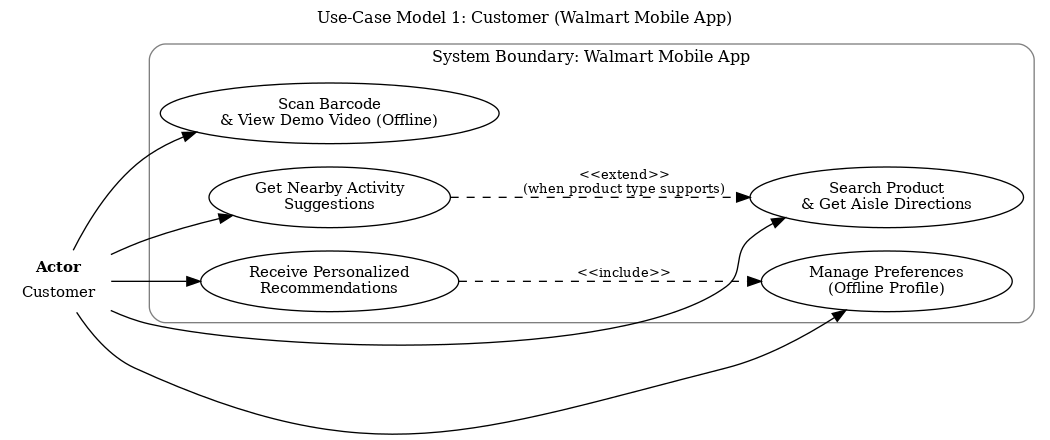
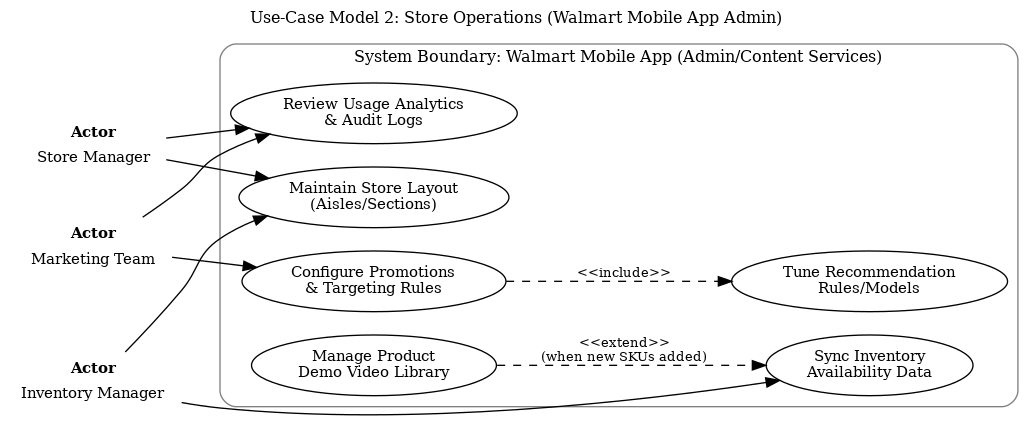
This section extends the Walmart mobile application design by adding use-case models, detailed use-case descriptions, and an initial object-oriented (OO) class diagram. Use-case modeling supports requirements analysis by describing how actors interact with the system, while OO analysis helps identify core classes, attributes, and behaviors that guide implementation (Dennis et al., 2018; Object Management Group [OMG], 2017).
Use-Case Model Diagrams
Use-Case Model 1: Customer
Use-Case Model 2: Store Operations (Store Manager / Inventory Manager / Marketing)
Use-Case Descriptions
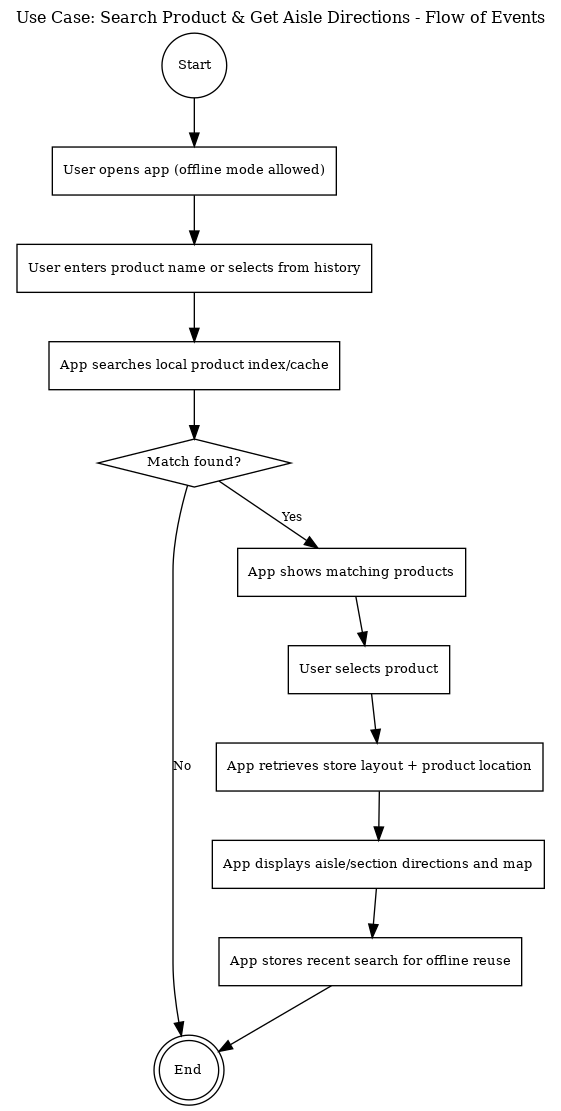
UC-C1: Search Product & Get Aisle Directions
| Use case title | UC-C1: Search Product & Get Aisle Directions |
| Brief description | Customer searches for a product and receives aisle/section directions using cached product and layout data. |
| Precondition | Customer has the Walmart app installed; a store location is selected; offline cache contains a recent layout (or last-known layout). |
| Postconditions | Directions are displayed; recent search is saved; analytics events may be synchronized when online. |
| Special requirements | Usability: results should display within 2 seconds; offline mode must work with cached data; accessibility support (screen readers). |
| Relationships | Referenced by activity suggestions; map view may be reused by recommendation results. |
| Extensions | If no match is found, system displays 'No results' and offers category browsing; if layout data is stale, system warns user and suggests syncing. |
Flow of events (diagram):
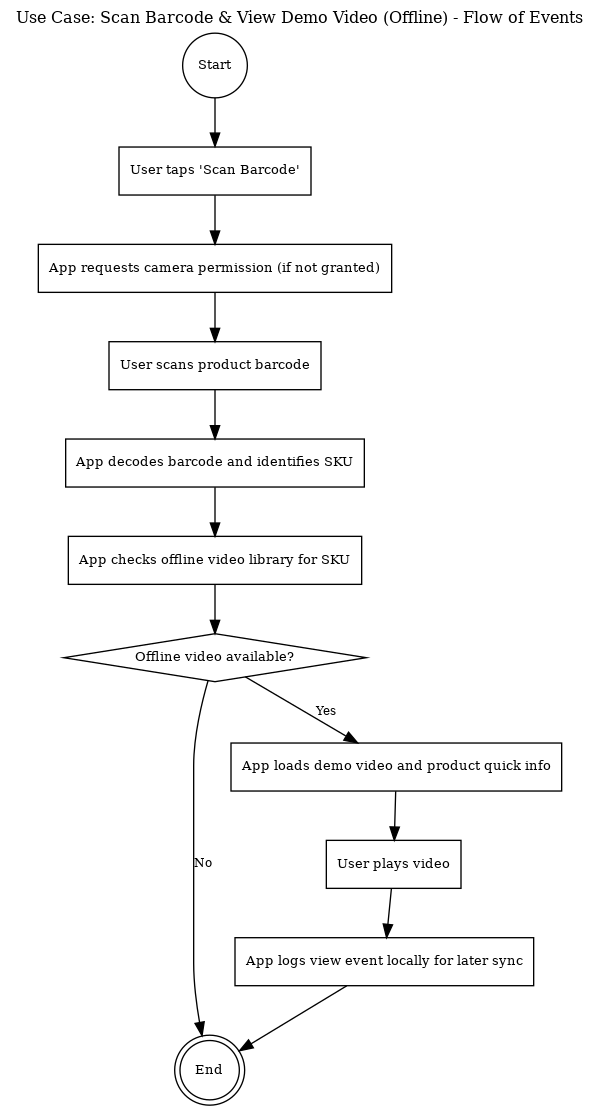
UC-C2: Scan Barcode & View Demo Video (Offline)
| Use case title | UC-C2: Scan Barcode & View Demo Video (Offline) |
| Brief description | Customer scans a product barcode to view an offline demo video and quick product details. |
| Precondition | Customer grants camera permission; barcode is scannable; offline demo video exists for some SKUs. |
| Postconditions | Demo video is displayed/played; view event is queued for later sync; last-viewed SKU is stored locally. |
| Special requirements | Privacy: camera used only for scanning; Performance: offline video loads without buffering; storage limits enforced by the app. |
| Relationships | Supported by the admin 'Manage Product Demo Video Library' use case when new videos are published. |
| Extensions | If offline video is not available, system shows a message and (when online) offers to stream video; if scan fails, user can retry or type SKU. |
Flow of events (diagram):
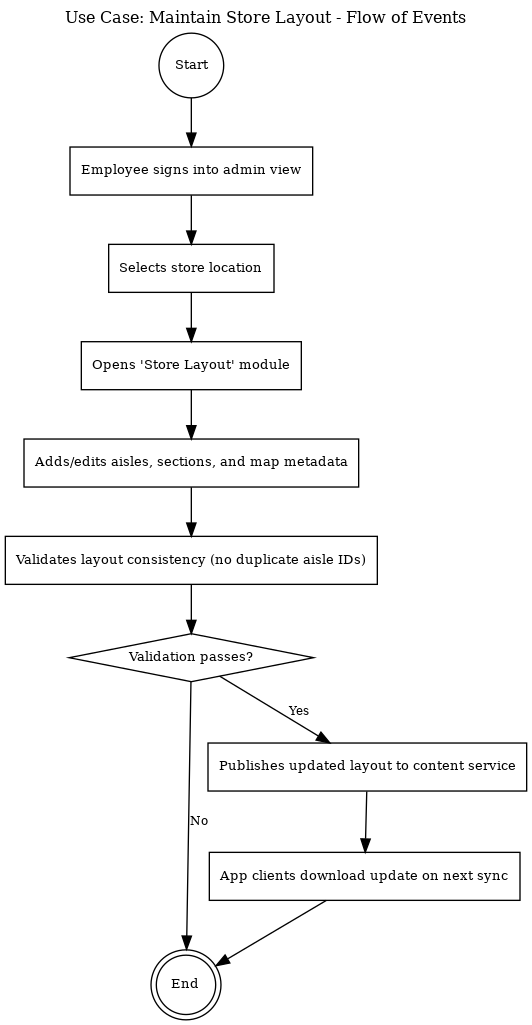
UC-O1: Maintain Store Layout (Aisles/Sections)
| Use case title | UC-O1: Maintain Store Layout (Aisles/Sections) |
| Brief description | Store operations staff update aisle/section mapping so navigation routes customers accurately. |
| Precondition | Authorized employee is authenticated; store location exists; current layout version is available. |
| Postconditions | New layout version is published; audit log updated; mobile clients can download layout on next sync. |
| Special requirements | Data integrity: prevent duplicate aisle IDs; changes must be versioned; approvals may be required for major edits. |
| Relationships | Directly supports UC-C1 (Search Product & Get Aisle Directions); includes audit logging. |
| Extensions | If validation fails, system blocks publishing and lists errors; if editors conflict, system prompts for merge/review. |
Flow of events (diagram):
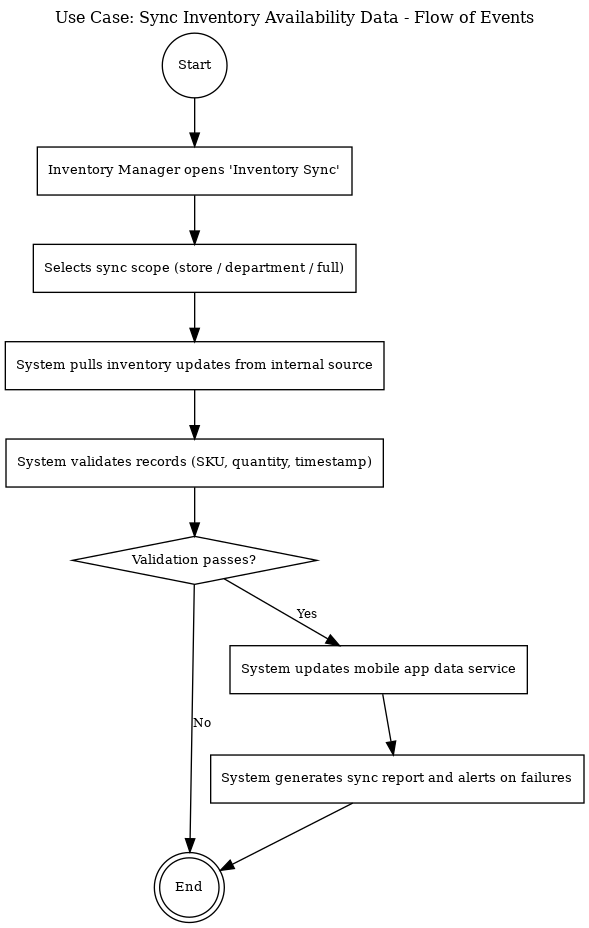
UC-O2: Sync Inventory Availability Data
| Use case title | UC-O2: Sync Inventory Availability Data |
| Brief description | Inventory manager synchronizes SKU availability used for product search accuracy and recommendations. |
| Precondition | Authorized inventory manager is authenticated; internal inventory source is reachable (batch or scheduled). |
| Postconditions | Inventory data store is updated; sync report generated; failures logged and alerted. |
| Special requirements | Reliability: updates should be atomic; timestamps preserved; partial retry supported; errors reported. |
| Relationships | Improves accuracy for UC-C1 and recommendation features; may trigger offline cache updates. |
| Extensions | If validation fails, system rejects bad records and continues with valid ones; if source unavailable, system schedules retry. |
Flow of events (diagram):
Object-Oriented (OO) Class Diagram (Draft)
The following class diagram provides an initial OO view of the Walmart mobile application. It identifies key entities (e.g., Product, Store, VideoAsset), core services (RecommendationEngine, OfflineCache), and generalized user roles (User → Customer/Employee) to support customer-facing and store-operations functions (Dennis et al., 2018; Pressman & Maxim, 2020).

Additional References (Part 4)
Dennis, A., Wixom, B. H., & Roth, R. M. (2018). Systems analysis and design (7th ed.). Wiley.
Object Management Group. (2017). Unified Modeling Language (UML) Version 2.5.1. OMG.
Pressman, R. S., & Maxim, B. R. (2020). Software engineering: A practitioner’s approach (9th ed.). McGraw-Hill Education.
Sommerville, I. (2016). Software engineering (10th ed.). Pearson.
Course Project Part 5 – Data Flow Diagram Project (Behavioral and Structural Diagrams)
This section extends the Week 4 work by completing the object-oriented class diagram with association roles and multiplicity, and by adding behavioral diagrams (sequence, activity, and state) for two use-case scenarios. These UML artifacts improve system design clarity by showing structure (classes and relationships) and behavior (object interactions and control flow) (Object Management Group [OMG], 2017; Dennis et al., 2018).
Extended OO Class Diagram (Associations, Roles, and Multiplicity)
The class diagram below extends the initial Week 4 draft by adding explicit associations and indicating object roles and multiplicity at each end to show how many instances may participate in each relationship (e.g., one Store contains one or more Aisles).

Behavioral Diagrams for Two Use-Case Scenarios
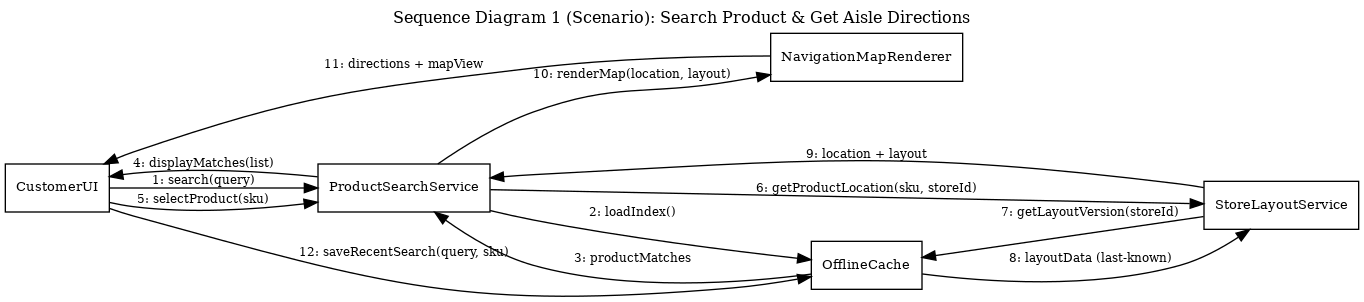
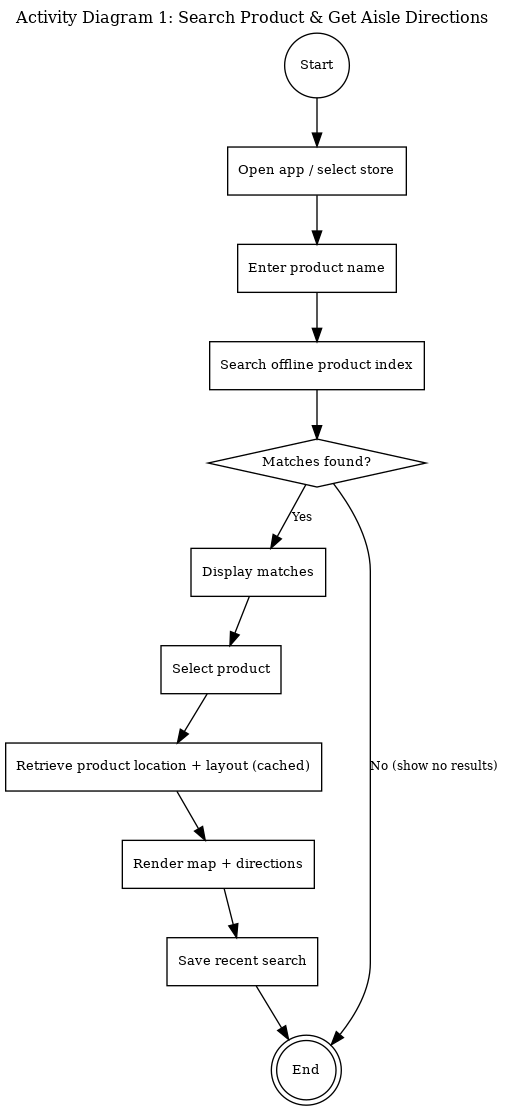
Scenario 1: UC-C1 Search Product & Get Aisle Directions
Assumptions for messages: The ProductSearchService queries the OfflineCache first to support the project requirement that core features work offline. StoreLayoutService retrieves the last-known layout version from cache to produce directions even without network connectivity. If fresher data exists online, it can be synchronized later without blocking the user experience.
Sequence diagram (objects and messages):
Activity diagram (control flow):
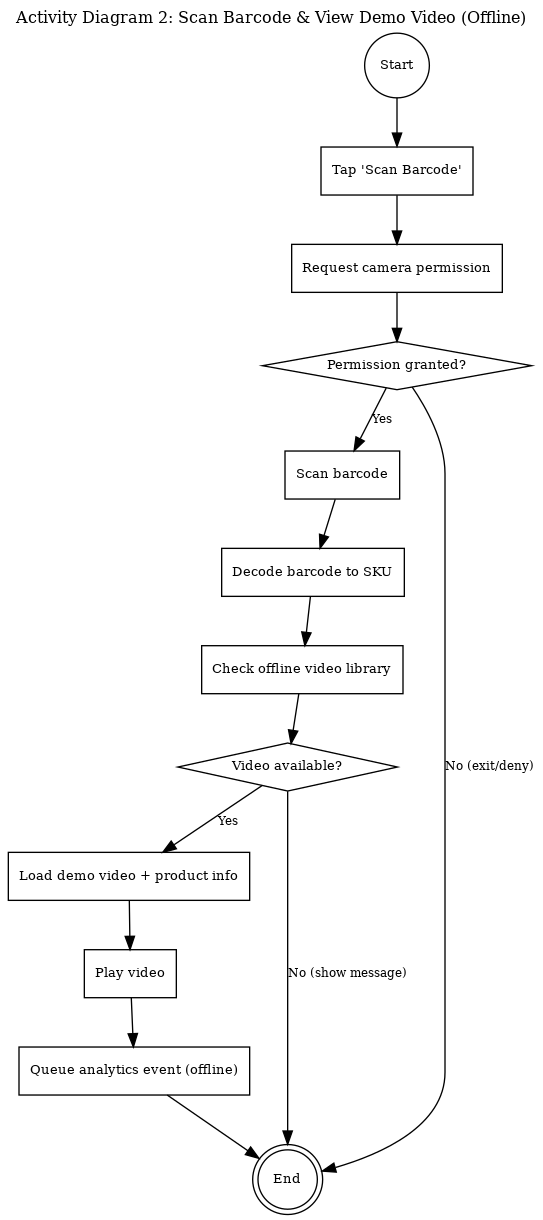
Scenario 2: UC-C2 Scan Barcode & View Demo Video (Offline)
Assumptions for messages: BarcodeDecoder returns a normalized SKU identifier used as the key for OfflineVideoLibrary lookups. Analytics events are written to an offline queue to respect the offline-first constraint and to avoid losing usage data when connectivity is limited.
Sequence diagram (objects and messages):

Activity diagram (control flow):
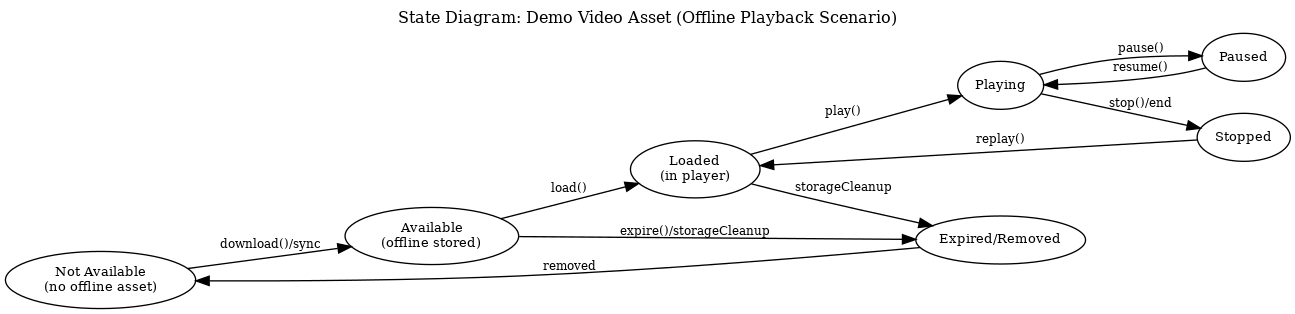
State Diagram
The state diagram below models the lifecycle of an offline demo video asset for the barcode scanning scenario. This helps ensure the system handles storage, playback, and cleanup behaviors consistently across the app.
References (Part 5)
Dennis, A., Wixom, B. H., & Roth, R. M. (2018). Systems analysis and design (7th ed.). Wiley.
Object Management Group. (2017). Unified Modeling Language (UML) Version 2.5.1. OMG.
Pressman, R. S., & Maxim, B. R. (2020). Software engineering: A practitioner’s approach (9th ed.). McGraw-Hill Education.
References
Walmart Inc. is a multinational retail corporation headquartered in Bentonville, Arkansas. It operates a chain of hypermarkets, discount department stores, and grocery stores, serving millions of customers daily. Walmart offers a wide range of products, including groceries, clothing, electronics, home goods, and sporting equipment. For the purposes of this project, Walmart is assumed to not currently have a mobile application. Developing a mobile app will enhance the in-store shopping experience, provide interactive product information, and guide customers through Walmart’s extensive inventory using data-driven and location-based features (Walmart Inc., 2025).
Walmart IT Department – Responsible for ensuring technical feasibility, maintaining the application, and integrating data-driven content.
Laudon, K. C., & Traver, C. G. (2023). E-commerce 2023: Business, technology, society (18th ed.). Pearson.
Walmart Inc. (2025). About Walmart. Retrieved from https://corporate.walmart.com/our-story
PMI. (2021). A guide to the project management body of knowledge (PMBOK guide) (7th ed.). Project Management Institute.
Schwalbe, K. (2021). Information technology project management (9th ed.). Cengage Learning.
Dennis, A., Wixom, B. H., & Roth, R. M. (2018). Systems analysis and design (7th ed.). Wiley.
Pressman, R. S., & Maxim, B. R. (2020). Software engineering: A practitioner’s approach (9th ed.). McGraw-Hill.
Sommerville, I. (2016). Software engineering (10th ed.). Pearson.
Object Management Group. (2017). Unified Modeling Language (UML) Version 2.5.1. OMG.
Pressman, R. S., & Maxim, B. R. (2020). Software engineering: A practitioner’s approach (9th ed.). McGraw-Hill Education.